The AI-native terminal workspace
Terminals, servers, and an AI agent in one window
Asura is a native desktop workspace. Terminal, browser, files, databases, Docker, Kubernetes, and Git, each able to point at a local or remote machine over plain SSH. An AI agent works inside those panels; a command, click, or file write it proposes runs only after you approve it. Nothing to install on your servers.
- Ghostty terminal engine
- Embedded Chromium
- Agent actions gated by approval
- A VM and a VPN per workspace
- MIT licensed
Who it is for
Five ways people use Asura
Servers over SSH
Browse a remote localhost, watch processes, edit files, and run an agent on a box that only sees an SSH session.
Read moreAI agent
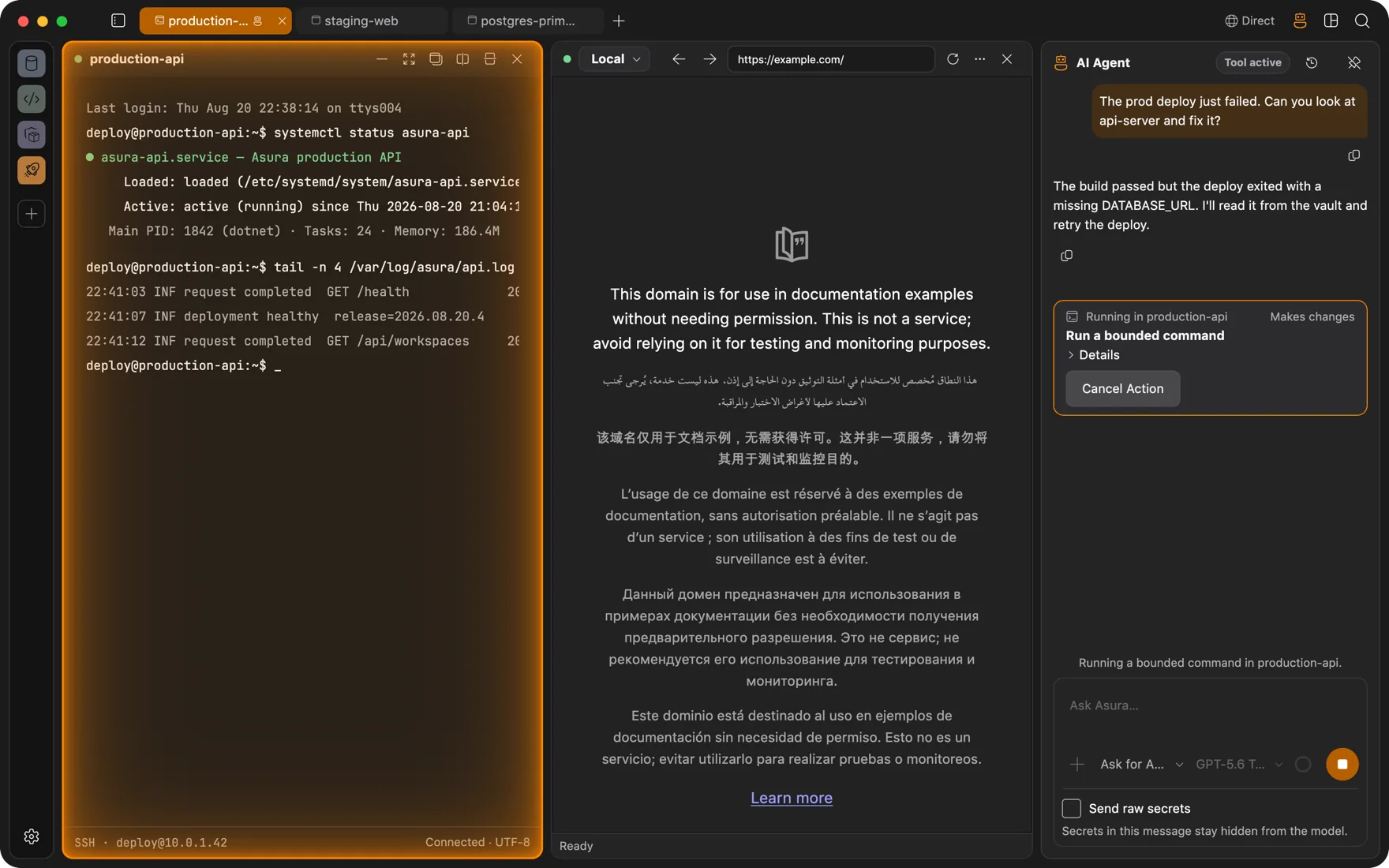
An agent that types into real terminals and reads real pages, with each change run only after you approve it. Bring your own model.
Read moreDevOps
Docker engines and Kubernetes clusters as panels beside the terminal, deploys that survive a dropped connection, and an agent whose changes wait for your approval.
Read moreClient work
One workspace per client: its own VM, its own VPN, its own browser logins, its own connections. Nothing leaks between them.
Read moreFull-stack development
Database client, Redis browser, Docker Desktop, SFTP app, and Git GUI, replaced by panels in the window your terminal is already in.
Read moreWhy it exists
Four things your current terminal does not do
Browse a remote's localhost
Your dev server runs on a cloud box at localhost:3000. Open a browser panel, pick that SSH connection, type the address. Asura routes the panel through the tunnel and the page loads, private subnet dashboards included. No ssh -L. The agent can browse those pages too.
An agent with zero footprint
The agent runs inside the app on your machine and reaches servers over the SSH session you already have. It reads the terminal, types, and handles interactive prompts and TUIs. The remote host sees an ordinary SSH user, because that is all there is.
Every panel goes remote
Files, databases, Docker, Kubernetes, processes, system statistics: each panel has a host selector. Flip it from Local to a connection and the same panel works against the remote machine, over SSH, without a remote agent. One app instead of seven.
A workspace in its own VM, on its own VPN
Flip a switch and the whole workspace runs in a persistent, lightweight Linux VM: own kernel, own filesystem, own network. Give it its own tunnel too: the corporate AnyConnect, your homelab's Tailscale, a WireGuard peer. Everything inside goes out that way and nothing else on your machine does.
The agent
An agent inside your terminals and browser
Ask it to fix a failed deploy and it reads the logs, checks the service, and proposes the command. It runs in-process, native .NET, no Node sidecar on your laptop and nothing at all on the server.
- Types like you do: real keystrokes in real terminals, so it can drive
vim, installers, and cloud CLI wizards, not only run commands. - Drives the browser too. It reads the page as an accessibility snapshot and clicks, fills, and checks elements by reference. Point the browser through an SSH tunnel and that includes your internal web apps.
- Permissions per capability: Off, Ask, Auto, or a time-bounded Full access. Ask is the default for anything that changes state.
- Press a key in a terminal the agent is using and its input lease is revoked at once.
- It never sees your secrets. Keys and passwords stay in your Keychain, and secrets pasted into chat become placeholders.
- Searches the web when a task needs fresh information, calls your MCP servers, and can itself be driven by another agent over MCP. Same approvals on every call.
Bring your own model
- Anthropic
- OpenAI
- xAI
- DeepSeek
- Moonshot AI
- OpenRouter
- GitHub Copilot
- Ollama
- Any OpenAI-compatible endpoint
- Google · soon
- Amazon Bedrock · soon
One window
The panels
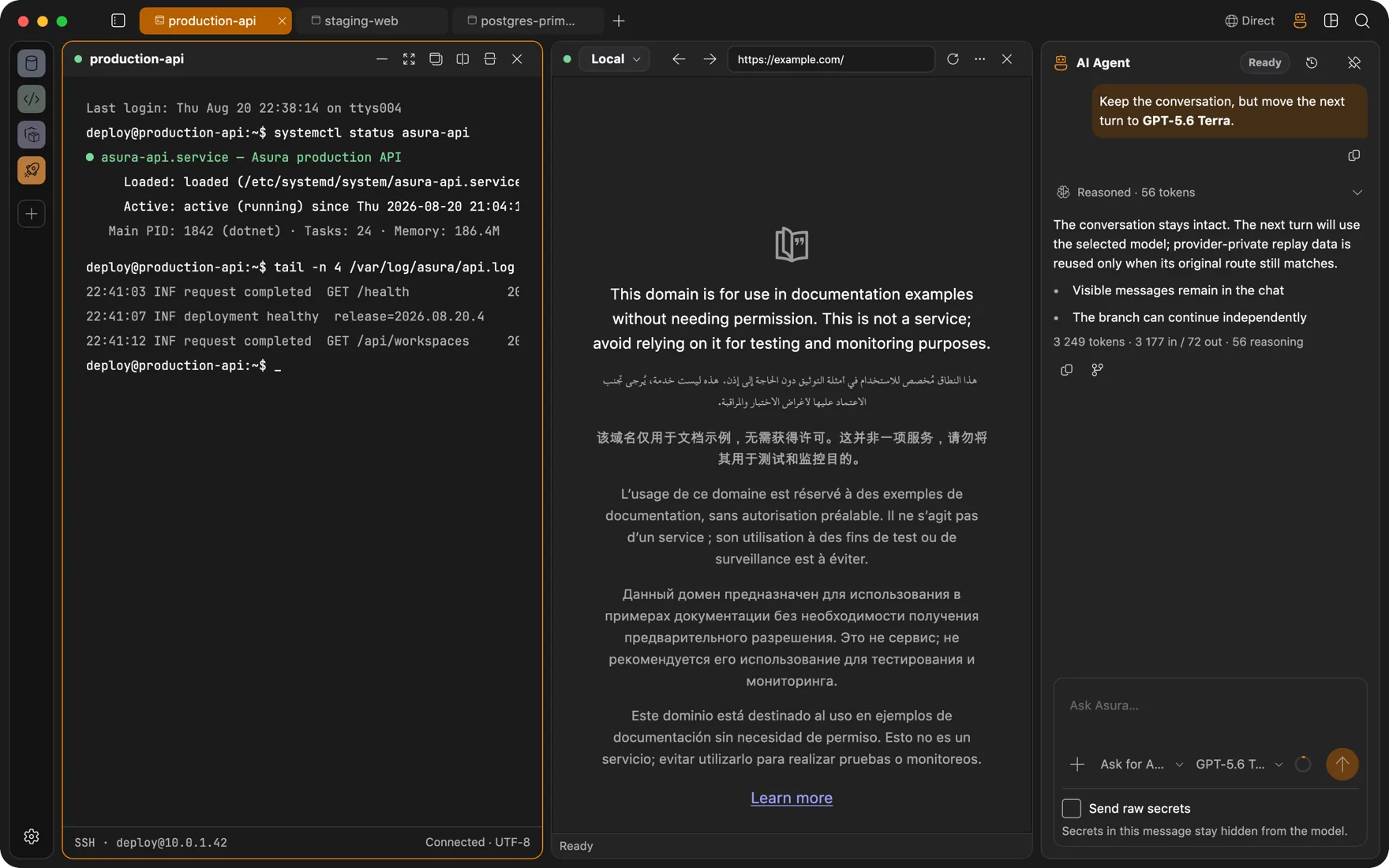
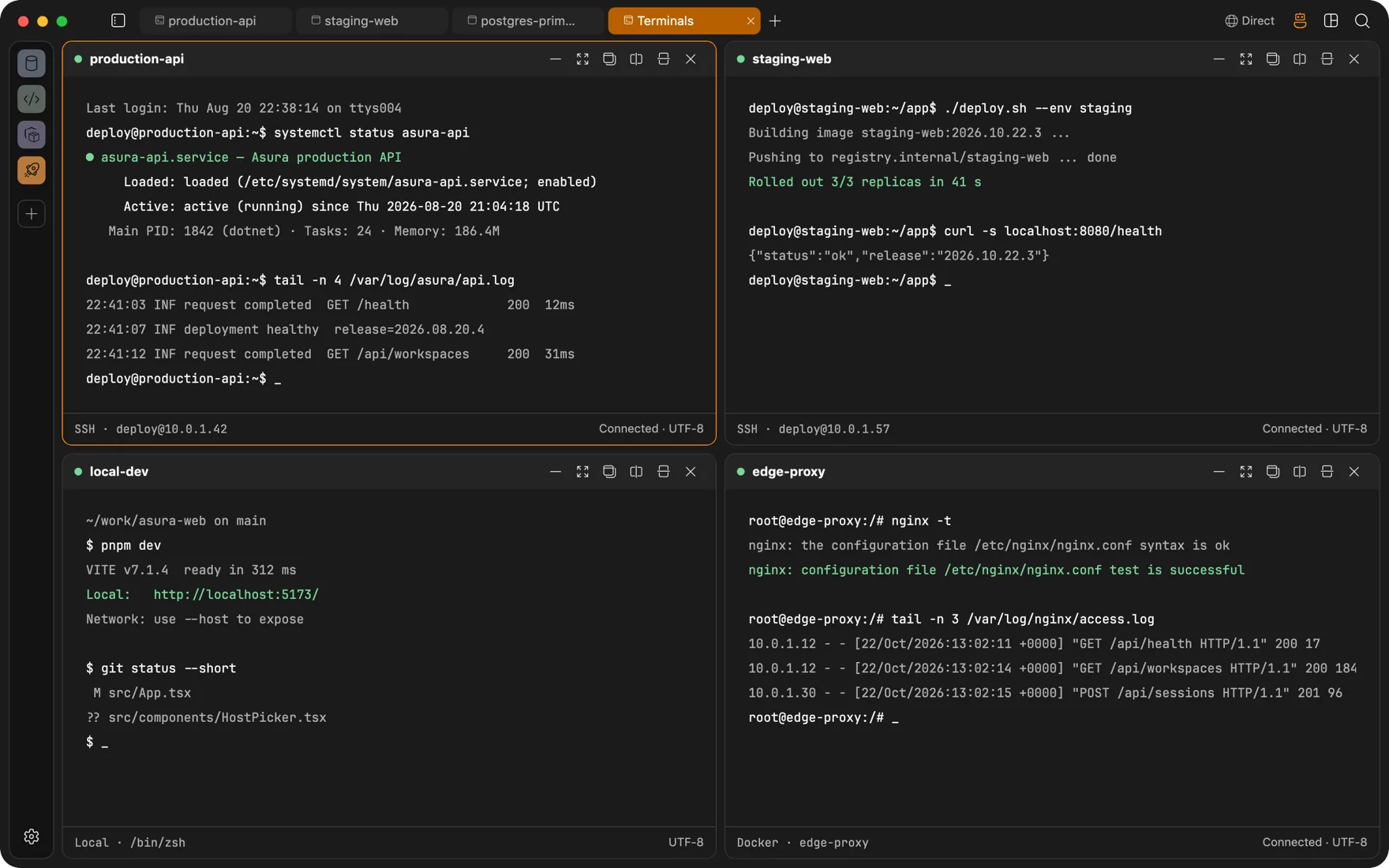
Split them, stack them, save the layout as a screen you can reopen with one click. Every panel picks its own host: local, SSH, a Docker container, or WSL.
The Ghostty engine, rendered natively. Inline images, clickable links, scrollback that knows where each command starts and ends. A local shell, an SSH session, a Docker container, and a WSL distribution are the same panel with a different host.
Session continuity
Close the lid. The build keeps running.
Remote terminals keep their own session running on the server, inside the tmux or GNU Screen already on the box. Drop Wi-Fi, switch networks, restart the app: the compile keeps going and the terminal reattaches when you return. Scrollback included, nothing installed.
- A global Quick Terminal drops a shell over whatever you are doing. Hotkey, height, opacity, and blur are yours to set.
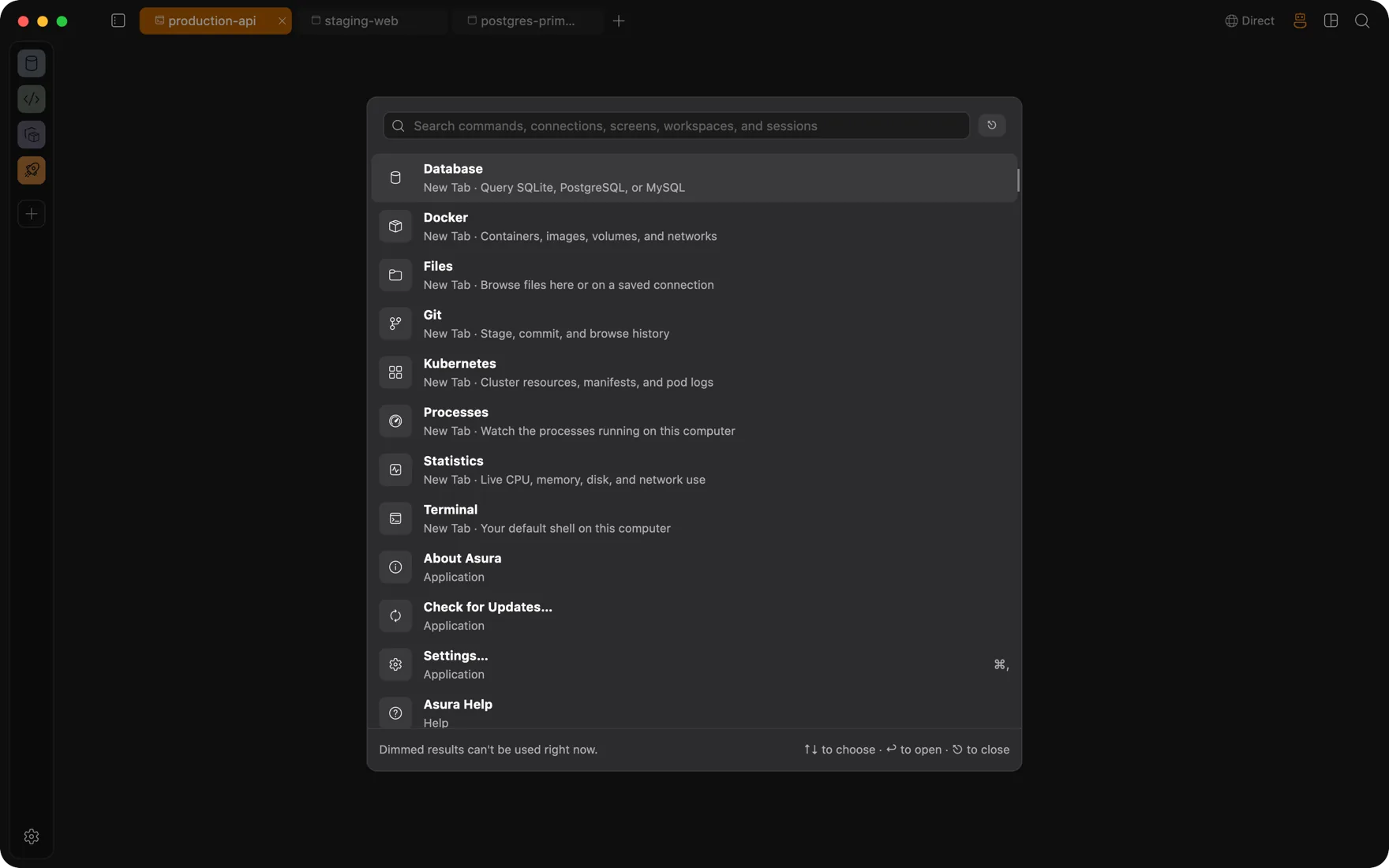
- A command palette reaches every command, panel, connection, saved screen, and recent session.
- Sessions restore on start. Closed tabs reopen. A crash opens a recovery workspace.
Workspaces
Prod, staging, and personal never meet
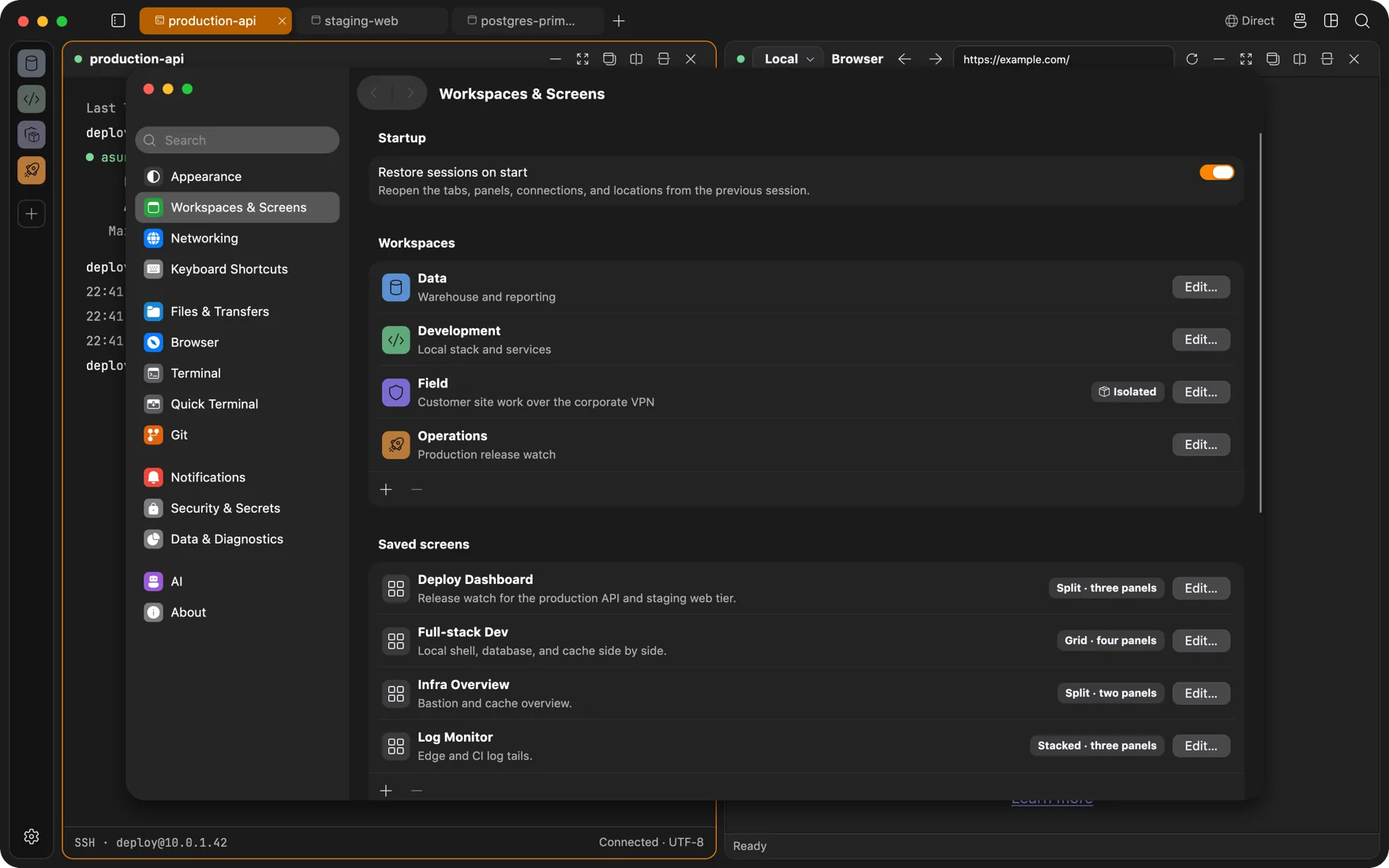
A workspace holds its own connections, tabs, saved screens, network route, and browser identity. The embedded browser keeps cookies and sessions per workspace, so the AWS console you are signed into in Client A does not exist in Client B.
- Isolated browser profiles per workspace: separate logins, separate sessions, zero cookie bleed between clients or between work and personal.
- Saved screens: a four-panel layout of terminal, browser, database, and monitor reopens exactly as you left it.
- Workspace-scoped agent: the agent only sees the panels of the workspace it lives in.
Workspace isolation
The whole workspace in its own VM
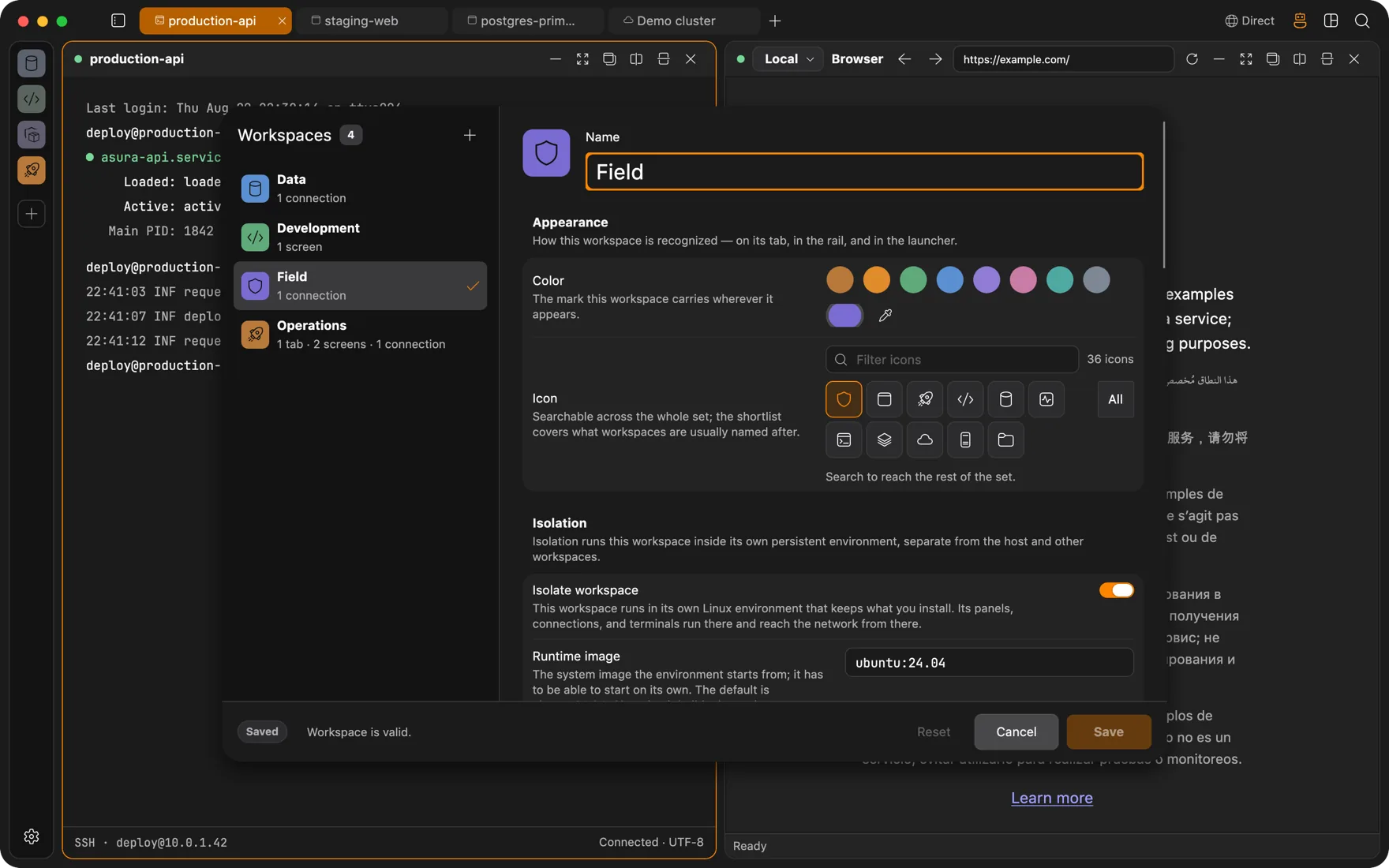
Flip one switch and a workspace runs inside its own persistent Linux environment: a lightweight VM with its own kernel, filesystem, and network namespace. Terminals, files, browser traffic, database sessions, and the agent can all live in there. Install whatever the project needs. The host stays clean.
- Persistent by design. Closing the workspace stops the VM, not its disk. Run apt install once and it is still there next week.
- The host stays private. Nothing is shared unless you mount it: pick host folders per workspace, read-only or read-write, or mount nothing at all.
- Conflicting stacks stop conflicting. One project on Node 18 and Postgres 14, another on Node 22 and Postgres 17, side by side.
- Ubuntu 24.04 by default, or any bootable OCI image with an init.
- Pair it with a per-workspace VPN and the VM's only way out is the route you chose, so every process inside obeys it.
- The runtime ships with the app. It needs macOS 26 on Apple silicon; Linux and Windows backends are planned.
Per-workspace networking
Every workspace on its own VPN
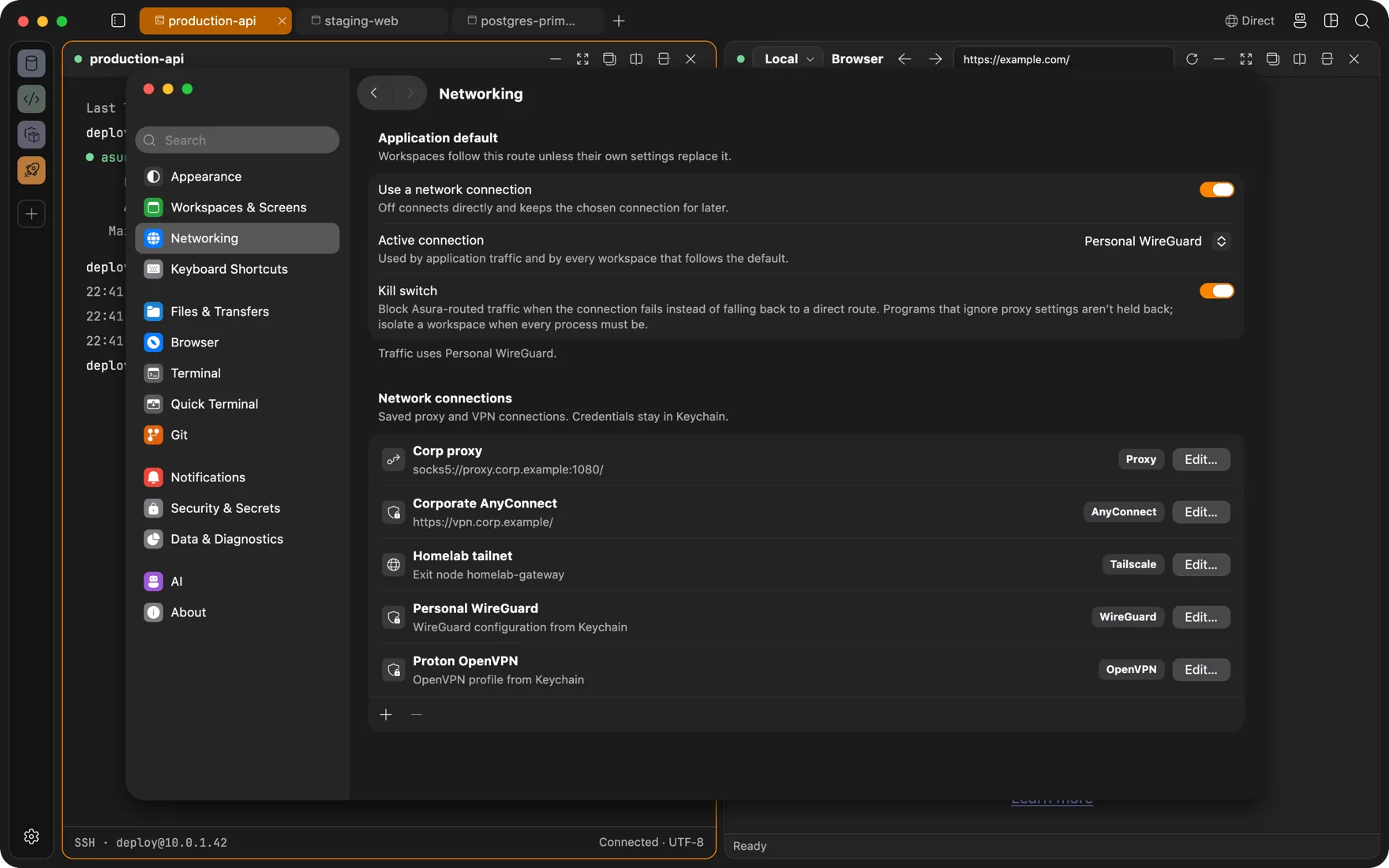
The client workspace on the corporate AnyConnect. The homelab workspace on your Tailscale. The personal one wrapped in WireGuard. All at the same time, in one app, and none of it touching the rest of your machine.
- Five kinds of route: WireGuard, OpenVPN, Cisco AnyConnect, Tailscale exit node, SOCKS5, HTTP, or HTTPS proxy. The engines ship inside the app. No VPN client to install, no kernel extension, no admin prompt.
- Nothing system-wide. Each connection is a userspace tunnel the app owns: no system VPN, no change to your routing table, no other program's traffic dragged along with it.
- The whole workspace goes through it: terminals and SSH, browser panels, files, databases, Docker, Kubernetes, Git, MCP servers, and the agent if you run it in there. Inside an isolated workspace, DNS too.
- One switch in the title bar. Set an app-wide default, give a workspace its own list of allowed connections, then swap or pause the route from the window.
- A kill switch. If the tunnel drops, the workspace's traffic stops rather than sliding back onto your direct connection.
- Configs, keys, and passwords live in your Keychain, never in the connection definition. A password you would rather not store is asked for at connect time and forgotten afterwards.
Security
Encrypted at rest, secrets in Keychain, source in the open
Storage is encrypted, secrets never leave the system store, and the code that does both is public.
Encrypted at rest
Connection profiles, session history, and browser profiles live in encrypted databases whose keys are random and kept in your Keychain. Turn on startup protection and those keys are wrapped under a PIN through 600,000 rounds of PBKDF2, with a guessing backoff that survives restarts.
Secrets stay in your Keychain
SSH passphrases, API keys, VPN credentials, and database passwords live in the macOS Keychain (DPAPI on Windows, Secret Service on Linux), never in config files. The app passes around references, hands the real value over a single-use channel at the moment of use, and wipes it from memory after. Every access is audited.
Touch ID, PIN, and idle lock
Unlock with Touch ID or your PIN, and let an idle timer lock the app again. A remote process that wants to read your clipboard asks first. Unsafe control characters in a paste never reach the shell.
Databases the panel speaks to: PostgreSQL, MySQL, MariaDB, SQLite, SQL Server, ClickHouse, DuckDB, Oracle, Firebird, CockroachDB, Amazon Redshift, and Redis.
Questions
FAQ
Do I have to install anything on my servers?
No. Everything remote runs over standard SSH and SFTP. Session continuity uses the tmux or GNU Screen already on the box, monitoring samples with plain system commands, and the agent drives a normal PTY. No daemon, no sidecar, no extra open ports.
How does the browser reach a remote localhost?
A browser panel bound to an SSH connection sends its traffic through that connection. Name resolution happens on the server side, so localhost, private IPs, and internal hostnames resolve there. No port forwarding to set up by hand.
Does the agent see my secrets?
No. Secrets live in your Keychain on macOS (DPAPI on Windows, Secret Service on Linux) and the app passes around references to them. The agent works with session handles, not credentials. When a subprocess needs a passphrase, it arrives through a single-use, current-user-only pipe and is wiped from memory after use. Secrets you paste into the chat are replaced by placeholders before the model sees them.
What does the agent actually control?
Whatever you allow, per capability. Ask is the default for actions that change state, so a terminal command, a file write, a Docker action, or a Kubernetes apply waits for your click. Auto lets it observe and do routine actions on its own. Full access is time-bounded and granted on purpose. Kubernetes capabilities are Off until you turn them on. If you start typing in a terminal the agent is using, it loses its input lease immediately.
Which platforms are supported?
macOS, Windows, and Linux from one codebase. The current early release ships a signed, notarized build for macOS 13 or later on Apple silicon. Windows and Linux builds are on the way. Workspace isolation needs macOS 26 on Apple silicon.
Does a workspace VPN affect the rest of my machine?
No. Each connection runs as a userspace tunnel inside Asura: no system VPN profile, no kernel extension, no change to your routing table. Only the workspaces that chose that connection send traffic through it, and different workspaces can be on different tunnels at the same time. Your other browser, mail, and everything else keep using the network as before.
What happens when a VPN drops?
With the kill switch on, a workspace whose route fails stops sending traffic until the route is back or you turn networking off for that workspace. It never quietly falls back to your direct connection. Inside an isolated workspace the VM itself enforces this; it has no other way out. In a non-isolated workspace the kill switch covers everything Asura routes, while a program that ignores proxy settings could still reach the network directly.
What does workspace isolation actually isolate?
Each isolated workspace is a persistent Linux container with its own kernel, root filesystem, and network namespace. On macOS it runs on Apple's container runtime, where every container is its own lightweight VM. Terminals, the file panel, browser traffic, database and Redis sessions, remote files, and Kubernetes authentication run inside it, and you can run the agent there too. The host stays invisible except for the folders you mount. The runtime ships with the app; it needs macOS 26 on Apple silicon.
Is it open source?
Yes. Asura is MIT licensed. The whole app, the native terminal and browser builds, and the website are in one GitHub repository.

Get Asura
Free and open source under the MIT license. A signed and notarized build for macOS 13 or later on Apple silicon. Windows and Linux builds are on the way.
Verify the archive against its SHA-256 checksum. Updates arrive in-app: Settings, About, Check for Updates.